· Autoriax · Updated
Automating Social Media Posts: A Step-by-Step Workflow
A step-by-step workflow to automate social media posts with AI using n8n approval gates, a confidence-score rubric, and human-in-the-loop triage that protects brand voice.

Most guides on social media automation answer the wrong question. They show you how to generate posts faster. But writing posts was never the real bottleneck. The bottleneck is deciding whether each AI draft is good enough to publish, and that decision, repeated dozens of times a week, is what drains a marketing team.
The scale is real. DataReportal counts 5.66 billion social media user identities as of October 2025, and the average user is active on 6.75 platforms each month [1]. Keeping a consistent presence across that many surfaces is more than manual posting can sustain. So automation makes sense. What most teams get wrong is automating the production and leaving the judgment unmanaged, which just moves the workload from writing to reviewing.
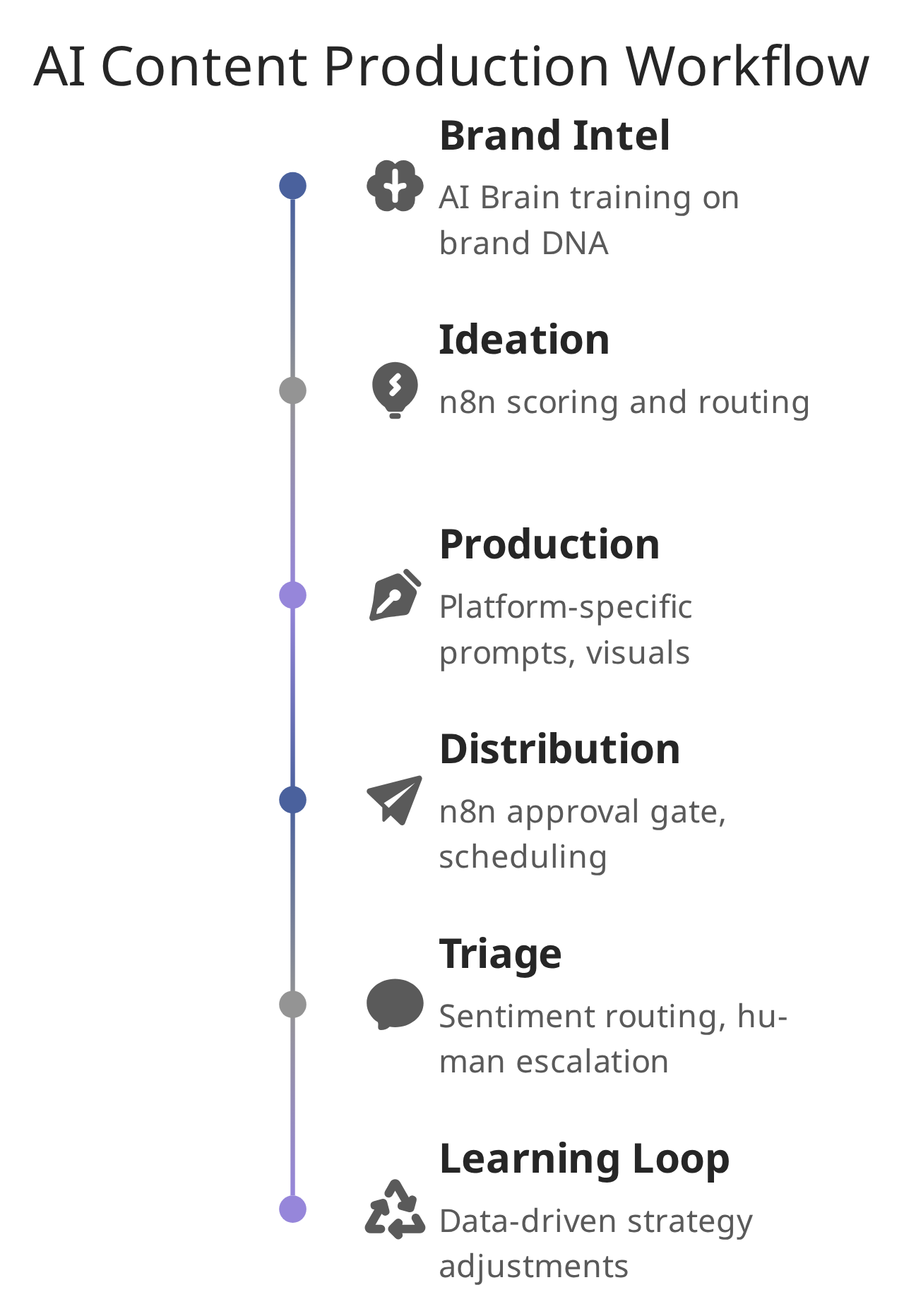
This guide lays out a six-step workflow built around that insight. The goal is not to post more. It is to build a triage system so humans review only the drafts that actually need judgment, and everything else flows through on rules you set once.
Quick Facts
- 87% of marketers report using generative AI in at least one recurring workflow, up from 51% in 2024, per Salesforce’s State of Marketing research [2].
- Large-model hallucination rates range from roughly 1.8% to 24.2% depending on the model, so a human review gate is not optional for factual posts [3].
- 73% of consumers expect a brand to respond to a social message within 24 hours [4].
Why Automation Without Judgment Fails
Scheduling tools solved the “when to post” problem years ago. They did nothing for the “is this worth posting” problem. That is where AI both helps and hurts: it produces drafts in seconds, but it also produces more drafts to check.
The real bottleneck for busy marketers is decision fatigue, not content creation. Deciding which AI drafts to post, which to revise, and which to discard can take longer than writing from scratch. Without a structured triage system, teams either over-review every draft, which erases the time savings, or publish unchecked content, which risks brand damage.
From Task Automation to Agentic Workflows
Automation used to mean single repetitive tasks: auto-generating UTM parameters, cleaning data, scheduling a queue. The newer pattern is agentic, where a system can read context, weigh options, and act across platforms without step-by-step instructions. Adoption has climbed fast: Salesforce’s State of Marketing research reports 87% of marketers using generative AI in at least one recurring workflow, up from 51% in 2024 [2].
Agentic capability does not remove the need for oversight. It changes where oversight belongs. The point is not to replace the marketer but to hand off the high-volume, low-creativity work so human attention lands on strategy and genuine connection.
Key Takeaway: Automation fails when it skips editorial judgment. The bottleneck is decision fatigue, not production. A triage system is what reclaims time without surrendering brand voice.
Before You Automate: Run a Decision-Fatigue Audit
The workflow below only pays off if you know which decisions are actually draining you. Spend one week logging every content decision you make, then sort each into one of three buckets. This audit is the foundation; skip it and you will automate the wrong things.
| Decision type | Example | Automate? |
|---|---|---|
| Rule-decidable | Posting time, hashtag set, image resize per platform | Yes, fully. These follow patterns a rule can encode. |
| Confidence-gated | ”Is this caption on-brand?” “Is this claim factual?” | Partly. Route by a confidence score; humans see only the uncertain ones. |
| Judgment-only | Influencer approvals, PR-sensitive replies, campaign strategy | No. Keep these human, every time. |
Count how many weekly decisions fall into each row. Most teams find the top row is 60 to 80% of their decisions and the bottom row is a handful. That ratio is your automation budget: the top row flows through on rules, the middle row goes through the approval gate in Step 4, and the bottom row stays on your desk. If you cannot sort a decision into a bucket, treat it as judgment-only until you can.
Step 1: Brand Intelligence, Training Your AI
Effective automation begins with a defined voice. You cannot automate a brand voice you have not written down. Modern systems build a brand profile by analyzing your existing material: sentence length, vocabulary, tone, recurring phrases, and visual identity like colors and fonts. That profile becomes the reference every later step checks against.
Without it, AI output drifts to a flat, generic middle that reads like every other automated feed. Consumer trust in AI-generated content is already low: Emplifi’s 2026 research ranks AI-made content among the least trusted formats, at roughly 31% [5]. Brand-specific training is what pulls output back toward something recognizably yours.
Web Crawling for Brand DNA
The usual starting point is a crawl of your own properties:
- Input: Your website, blog archive, and existing social posts.
- Analysis: Sentence structure, vocabulary complexity, emotional tone, and visual identity.
- Output: A brand personality profile (professional versus casual, say) and a set of messaging pillars that guide every later generation step.
This step is not optional. Skip it and your posts sound technically correct but emotionally blank.
Key Takeaway: Train the AI on your own material before generating a single post. Generic output is the fastest way to erode the trust your brand already holds.
Step 2: Content Ideation, Categorizing to Reduce Decisions
Deciding what to post is often the biggest blocker to consistency. Instead of open-ended brainstorming, have the AI generate content into fixed buckets tied to your audience’s needs. That turns a creative void into a selection task, which is far cheaper on attention:
- Authority: Expert insight and principles that position your brand as a source.
- Pain-point solutions: Content answering specific customer problems with concrete advice.
- Engagement: Questions and prompts designed to start conversation.
Scoring and Routing Ideas in n8n
This is where a custom pipeline beats a generic scheduler. In n8n you build decision nodes that score each generated topic for relevance and brand fit, then route accordingly: high-confidence topics go straight to production, low-confidence topics trigger a Slack approval request [6]. You keep a master toggle to switch topics on or off. The effect is fewer weekly decision points, concentrated on the few that matter.
Key Takeaway: Fixed content buckets plus n8n routing cut the number of weekly decisions, because humans only touch topics the system flags as uncertain.
Step 3: Multimodal Production, Writing and Visuals
Once topics are approved, the AI drafts. HubSpot’s State of Marketing research reports 80% of marketers now use AI for content creation, which covers drafting and ideation [7]. Quality varies with how prompts are built and whether output is tailored per platform.
Platform-Specific Prompts
A professional, insight-led tone fits LinkedIn. A casual, visual approach suits Instagram. Concise, witty copy performs on X. n8n can route the same base content to different model prompts by target platform, so each post is shaped for its environment [6].
- Copy and hashtags: Platform-specific captions, hooks, and tags.
- Visuals: Image and short-video generation, sized per platform.
- Repurposing: One long-form blog post becomes a LinkedIn article, a short-video script, and an X thread. This is the biggest time-saver in production.
Key Takeaway: Platform-specific prompt routing lets one base idea adapt to LinkedIn, Instagram, and X without manual rewrites.
Step 4: The Confidence Gate, Where Automation Meets Judgment
Scheduling is the easy part. The approval gate before scheduling is where most brands either save time or create a mess. The gate works on a confidence score: the n8n workflow scores each generated post, and anything below your threshold goes to Slack for human review before it can reach the queue [6]. Everything above the threshold is queued automatically.
A Concrete Confidence-Score Rubric
“Confidence score” is vague until you define what it measures. Score each draft on three checks and route on the total:
- Brand-voice match (0 to 4): Does the draft fit the Step 1 profile on tone, length, and vocabulary? Modern setups can compute a similarity score against your brand samples.
- Factual-claim flag (0 or −5): Does the post state a statistic, a date, a price, or a named fact? If yes, force it below the auto-publish threshold. This is the safeguard against hallucination, which runs anywhere from 1.8% to 24.2% depending on the model [3].
- Platform-fit (0 to 3): Length, format, and hashtag conventions for the target platform.
Set the auto-publish threshold where you are comfortable, for example 6 of 7 with no factual flag. Posts that clear it queue automatically. Everything else waits for a human. Tune the threshold over two weeks by checking how often you approve flagged posts unchanged: if that rate is high, your threshold is too strict; if you reject many auto-published posts after the fact, it is too loose.
Key Takeaway: A defined rubric turns a vague “confidence score” into a rule you can tune. Forcing every factual claim to human review is the single most important line in it.
Step 5: Smart Distribution
Posting at random times wastes good content. Distribution engines analyze your own audience’s activity rather than generic benchmarks, then queue across platforms when your audience is active. Scheduled posts routinely perform as well as manually timed ones, so the time saved here is close to free [8]. The discipline is to keep scheduling downstream of the Step 4 gate, never ahead of it.
Key Takeaway: Automate timing freely, but only after the confidence gate. Scheduling unreviewed content is how brand voice slips.
Step 6: Engagement Triage at Scale
Social is now a front-line support channel. With 73% of consumers expecting a response within a day, routing incoming messages by urgency and sentiment matters as much as publishing [4].
Human-in-the-Loop for Sensitive Replies
The system scans incoming messages for signals like “help,” “broken,” or anger cues. Routine questions go to context-aware automated replies. Anything urgent, negative, or crisis-related bypasses automation and alerts a human immediately:
- Routine inquiries: Automated replies handle FAQs and standard requests.
- Escalations: Negative sentiment triggers a human handoff.
- PR-sensitive moments: Crisis keywords skip automation entirely and alert the comms team.
Over-automating sensitive interactions is one of the fastest ways to lose goodwill. The rule is simple: automate the routine, escalate the ambiguous.
Frequently Asked: How do you stop AI from replying to sensitive complaints?
Use keyword and sentiment routing. Messages flagged with negative emotion or crisis terms bypass automated replies and alert a human. Let AI handle routine inquiries only, with a clear escalation path for anything ambiguous.
Key Takeaway: Sentiment-based triage gets urgent messages to humans fast while automation clears the routine, which is how you meet the 24-hour expectation at scale.
The Learning Loop
Reporting that no one acts on is wasted automation. Pull metrics from every platform into one dashboard, then close the loop by feeding what works back into the content mix. In n8n, performance data can adjust the next cycle automatically: if short video outperforms text by a wide margin, the system raises video frequency.
flowchart TD
    A[Brand DNA Training] --> B[AI Topic Generation]
    B --> C{n8n Confidence Score}
    C -->|At or above threshold| D[Auto-Queue to Scheduler]
    C -->|Below threshold| E[Slack Human Review]
    E -->|Approved| D
    E -->|Rejected| F[Discard or Revise]
    D --> G[Multi-Platform Publishing]
    G --> H[Engagement Triage]
    H -->|Routine| I[Automated Reply]
    H -->|Urgent| J[Human Escalation via Slack]
    G --> K[Performance Dashboard]
    K --> L[Strategy Adjustment Loop]
    L --> B
Key Takeaway: A closed loop, where performance data shapes the next cycle, turns automation from a static tool into a system that improves on its own.
Choosing a Tool Stack
The right tools depend on team size and technical comfort. Rough categories for 2026:
| Category | Typical platforms | Best for |
|---|---|---|
| All-in-one management | Hootsuite, Sprout Social | Larger teams needing governance and listening |
| Visual-first planning | Later, Canva | Instagram, TikTok, and Pinterest-led brands |
| Budget scheduling | Buffer, Publer | Small businesses and solo operators |
| Workflow automation | n8n, Zapier | Teams building custom cross-platform pipelines |
n8n stands out for the approval routing described above, because its decision nodes let you score content, branch on the result, and connect to almost any API without writing code [6].
Key Takeaway: Match the stack to team size, but for the confidence-gated workflow at the heart of this guide, a node-based automation tool is what makes it buildable.
Best Practices and Red Flags
AI handles most of the repetitive work, but it is a co-pilot, not a pilot. A few guardrails keep it that way. Because hallucination rates can reach into the low-to-mid 20s percent depending on the model, a human should sign off on any high-stakes or regulated content, in finance or healthcare especially [3]. And because human oversight is still considered essential by most practitioners, Hootsuite’s 2026 research finds 91% rate human involvement as very important or critical, the review gate is a feature, not a bottleneck to engineer away [8].
- Be transparent: Consider provenance labels. Trust in AI content is low, so hiding its use rarely helps.
- Avoid black boxes: Prefer vendors that expose model behavior and audit logs.
- Do not over-automate human moments: Resizing graphics is perfect for AI. Approving influencer content or handling a PR crisis is not.
Key Takeaway: The confidence gate is not overhead. It is the line between scaling your brand and diluting it.
Conclusion
Automating social media is not set-it-and-forget-it. The costly part was never the writing. It is deciding whether each draft is good enough to publish. Run the decision-fatigue audit first, then build a confidence-gated n8n workflow so humans review only what the rubric flags, and the rest flows through on rules you control.
The six steps here, brand intelligence, ideation, production, the confidence gate, distribution, and the learning loop, give you a concrete path from scattered posting to consistent presence. Start by auditing where decision fatigue hits hardest this week, then encode your first routing rule. Your brand voice, and your calendar, will both benefit.
Sources
- [1] DataReportal / Kepios — Digital 2026 Global Overview Report (5.66bn user identities, 6.75 platforms per month, via GWI), Oct 2025 — https://datareportal.com/reports/digital-2026-global-overview-report
- [2] Salesforce — State of Marketing (generative AI adoption, 51% in 2024 to 87%) — https://www.salesforce.com/resources/research-reports/state-of-marketing/
- [3] Vectara — Hallucination Leaderboard (model hallucination rates, 1.8%–24.2%), Sep 2026 — https://github.com/vectara/hallucination-leaderboard
- [4] Sprout Social — 2025 Sprout Social Index (73% expect a response within 24 hours) — https://sproutsocial.com/insights/social-media-customer-service/
- [5] Emplifi — AI and Authentic Reviews: What Consumers Really Trust (2026) — https://emplifi.io/resources/infographic-ai-and-authentic-reviews-what-consumers-really-trust/
- [6] n8n — Automate Multi-Platform Social Media Content Creation with AI (workflow mechanics) — https://n8n.io/workflows/3066-automate-multi-platform-social-media-content-creation-with-ai/
- [7] HubSpot — State of Marketing 2026 (80% use AI for content creation) — https://blog.hubspot.com/marketing/state-of-generative-ai
- [8] Hootsuite — Social Trends 2026 and social media automation research (91% rate human involvement very important or critical; scheduled-post performance) — https://blog.hootsuite.com/social-media-automation/
Try Autoriax free — no credit card required
Get your first article in minutes. See the research depth before you commit.
Get 3 free articles3 articles free • No credit card • Cancel anytime